Case study 01 · HRIS / systems implementation
ELMO HRIS implementation: from manual chasing to tracked workflows
I took an ELMO HRIS rollout at a 330-person IT consulting firm from requirements through configuration, UAT and go-live, then ran the platform as its sole subject-matter expert.
At a glance
- Role
- Business Analyst; after go-live, sole ELMO subject-matter expert
- Organisation
- IT consulting firm, about 330 people, New Zealand
- System
- ELMO HRIS
- Functional areas
- Core HR, onboarding and offboarding, payroll, performance, learning
- Duration
- 6 to 8 months of implementation, then about 12 months running the platform
- Joined at
- Pre-implementation, after the platform was selected
- Worked with
- Senior stakeholders, project manager, heads of department, delivery leads, HR, payroll, finance, test analyst
- Tools
- Visio, Miro, Jira, Excel, OneNote
The problem
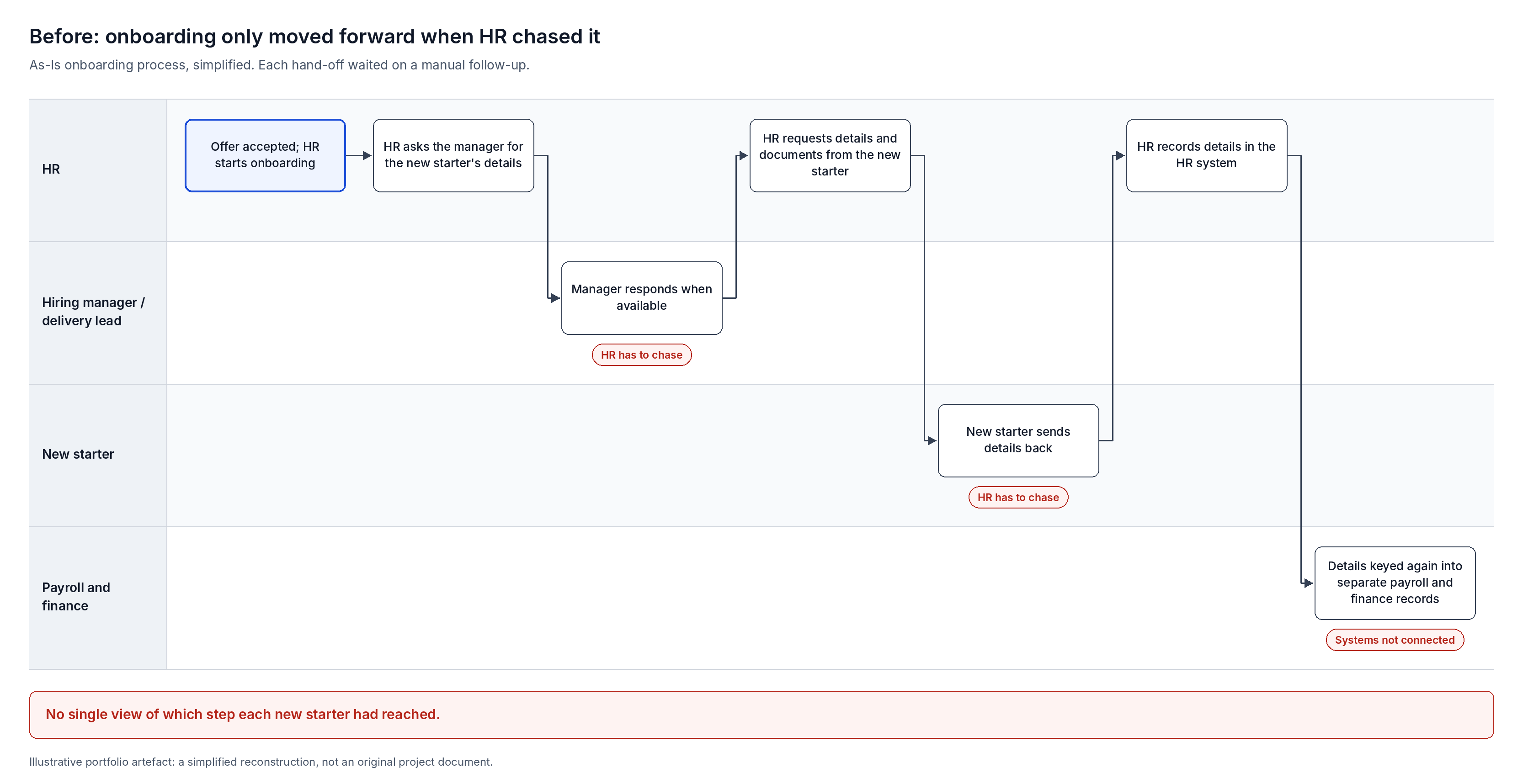
Onboarding and offboarding depended on people chasing each other, and nobody could see where a new starter or leaver was in the process.
As a consultancy, the firm had a constant flow of people joining and leaving. That made onboarding and offboarding the most pressing processes to fix.
- Disconnected systems. HR and payroll ran on separate solutions that were not connected. Finance kept its data across several databases and spreadsheets.
- Manual chasing. At each step, HR had to chase the hiring manager or delivery lead before the process could move on.
- No visibility. There was no single view of what stage each new starter or leaver had reached.
The organisation selected ELMO to bring Core HR, payroll, performance and learning onto one platform, with structured workflows in place of manual hand-offs.
My role and contribution
I joined as the Business Analyst at pre-implementation, after ELMO had been selected and a senior BA had completed the initial discovery. From there I led most of the BA work through to go-live, then owned the platform.
| Area | My involvement |
|---|---|
| Initial discovery and platform selection | Completed by a senior BA before I joined |
| Stakeholder interviews | Led |
| As-Is process mapping | Led |
| Requirements finalisation and validation | Led |
| To-Be process design | Led |
| Workflow, form and notification configuration in ELMO | Led: designed and built |
| User access, roles and permissions | Led |
| Policy publishing and sign-off | Led the setup in ELMO; policy owners wrote the content |
| UAT | Wrote the test scenarios and coordinated UAT; a test analyst executed them |
| Issues register | Set up and owned |
| User guides | Led: four guides |
| Post go-live support and continuous improvement | Led, as sole ELMO subject-matter expert |
| Integrations and custom reporting | Scoped for a later phase with developers |
Project phases
Discovery and selection
Senior BA, before I joined. ELMO selected.
Elicitation and As-Is
Interviews with every group. As-Is swimlane maps.
Requirements and To-Be
Requirements validated. To-Be workflows designed.
Build and configure
Workflows, forms and notifications. Access and permissions.
UAT and go-live
Workflow and payroll UAT. Issues register and user guides.
Platform ownership
Sole ELMO SME for about 12 months. Support and improvement.
Stakeholder engagement and current-state analysis
I interviewed everyone who touched the HR and payroll processes, then mapped how work actually flowed between them.
- Who I spoke to: HR, payroll, finance, delivery leads and heads of department.
- What we covered: payroll, onboarding, offboarding, performance management and learning.
- How I captured it: I asked permission to record each session, so I could revisit it and make sure no requirement was missed. I kept working notes in OneNote.
- What I produced: As-Is swimlane maps, built in Visio and Miro, showing each hand-off and where work stalled waiting for a response.
Requirements and future-state design
I turned the interview findings into final requirements and validated them with senior stakeholders before designing anything.
- 1.Took over the Excel requirements workbook from initial discovery and consolidated what each stakeholder group needed into a final set of requirements.
- 2.Walked senior stakeholders through them for validation and sign-off.
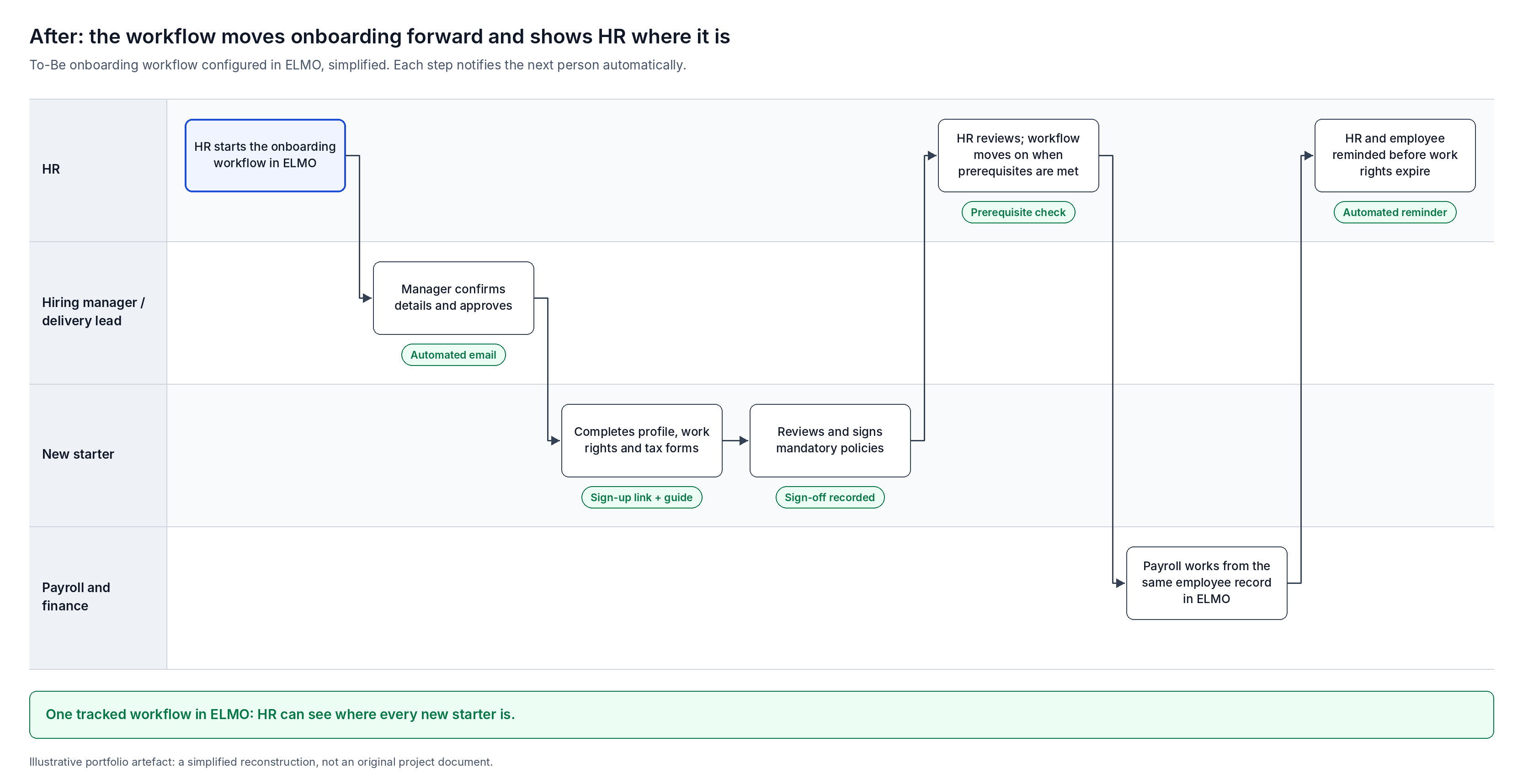
- 3.Designed the To-Be processes: each workflow step has a clear owner, a defined prerequisite or approval, and an automatic notification, so the system moves work forward instead of HR.
Solution design and configuration
I designed and built the onboarding and offboarding workflows in ELMO myself, along with the forms, fields and notifications they rely on.
Workflows
- Every step has prerequisites: an approval, a go-ahead, or a response from a named person before the workflow moves on.
- Each step triggers a series of notifications, by email and inside ELMO, that I designed and wrote. An alert fires when the step opens, a reminder follows a couple of hours later, and an urgent escalation goes out at 12, 24 or 36 hours depending on the step.
- Templates for onboarding and offboarding, with the forms built into the workflow.
Forms and fields
- Employee profile: legal name, first and last name, preferred name, date of birth and photo.
- Work rights form and tax information form, completed as part of onboarding.
- Other custom onboarding forms, templates and mandatory custom fields.
Compliance and governance
- Work rights expiry reminders. Custom notifications alert both the employee and HR before a visa or work right expires, so HR can follow up in time.
- Policy acknowledgement. I converted mandatory policies (privacy, cybersecurity, terms and conditions, conflict of interest and others) into forms, published them and made them mandatory. Every employee had to review and sign off, with email notifications prompting them. The cybersecurity team owned that policy's content; I proofread the other policies before publishing.
Access
- Set up user management, roles and permissions for the platform.
Performance and learning
- Set up performance review workflows and templates; performance reviews were run in ELMO.
- With an HR colleague, configured learning templates and customised ELMO's template content, with custom learning content planned next.
Testing and UAT
I wrote the UAT scenarios and coordinated testing before each go-live; a test analyst executed them against the system.
- Workflow UAT: run with the test analyst, HR staff, a delivery lead and others who take part in the workflows, to confirm they were ready to go live.
- Payroll UAT: run with a payroll officer, the test analyst and the finance team, including test payroll runs, before the payroll module went live.
- Beta testing: I also took part in beta testing once the build was ready for implementation.
- Issues register: I set up a shared issues register that everyone involved could access, and logged every issue and recommendation in it. It later became the backlog for continuous improvement.
Training and adoption
I wrote four user guides, each for a different audience, with step-by-step instructions and a screenshot for every step.
| Guide | Audience | What it covers |
|---|---|---|
| Super user guide | People with full control of the system | Running and administering the platform |
| Manager guide | Delivery leads and managers | What they handle day to day and how the onboarding and offboarding workflows work for them |
| General user guide | All staff | Everyday use of the platform |
| New starter guide | People being onboarded | Setting up their profile, plus FAQs; built into the platform and linked from the sign-up email |
Post go-live ownership and continuous improvement
After go-live I stayed on for about 12 months as the organisation's sole ELMO subject-matter expert.
- Provided technical support, including resolving the early teething issues once the workflows were live.
- Kept improving the workflows and adding automation to cut manual effort for stakeholders, working from the issues register.
- Scoped future integrations with payroll and legacy systems, and custom reporting for finance and payroll. These were budgeted for a later phase with developers.
Outcomes
The organisation moved its core people processes onto one platform, with onboarding and offboarding run as tracked workflows rather than email chains.
What changed for HR
HR no longer had to chase managers or new starters. Timed reminders and escalations moved each step forward automatically.
What was delivered
- Onboarding and offboarding run as structured workflows with approvals and automated notifications at every step.
- Payroll moved onto ELMO after UAT and test payroll runs.
- Performance reviews run in ELMO.
- Every employee's sign-off on mandatory policies recorded in one place.
- HR and employees reminded before work rights expire.
Challenges
- Working within the platform's customisation limits to get the automation and forms right.
- Designing automation that genuinely reduced manual effort for stakeholders.
- Custom reporting and integration with legacy systems needed developer work, so they were scoped into a later phase.
Lessons learned
- Listen actively to everyone, then go back to the process at a granular level. That is how no team or system gets left out of the future-state design.
- Joining after discovery, I re-validated requirements with every group before building, rather than relying on earlier notes.
- Recording interviews made requirements traceable back to the person who raised them.
- Writing guides per audience made adoption easier than one manual for everyone.
Organisation details are anonymised. Diagrams are illustrative reconstructions created for this portfolio, not original project documents.